Files
import type { SVGProps } from "react";

import { SpeechSandbox } from "../components/speech-sandbox";

export default function AIGenerateAudioPage() {
  return (
    <main className="flex min-h-screen flex-col bg-muted/30">
      <div className="mx-auto w-full max-w-2xl flex-1 px-4 pt-16 pb-16">
        <div className="mb-8 space-y-1">
          <div className="flex items-center space-x-2">
            <OpenAIIcon className="size-7 stroke-black dark:stroke-white" />
            <h1 className="font-normal text-xl tracking-tight md:text-2xl">
              <span>generateAudio</span>
            </h1>
          </div>
          <p className="text-pretty text-muted-foreground text-xs md:text-lg">
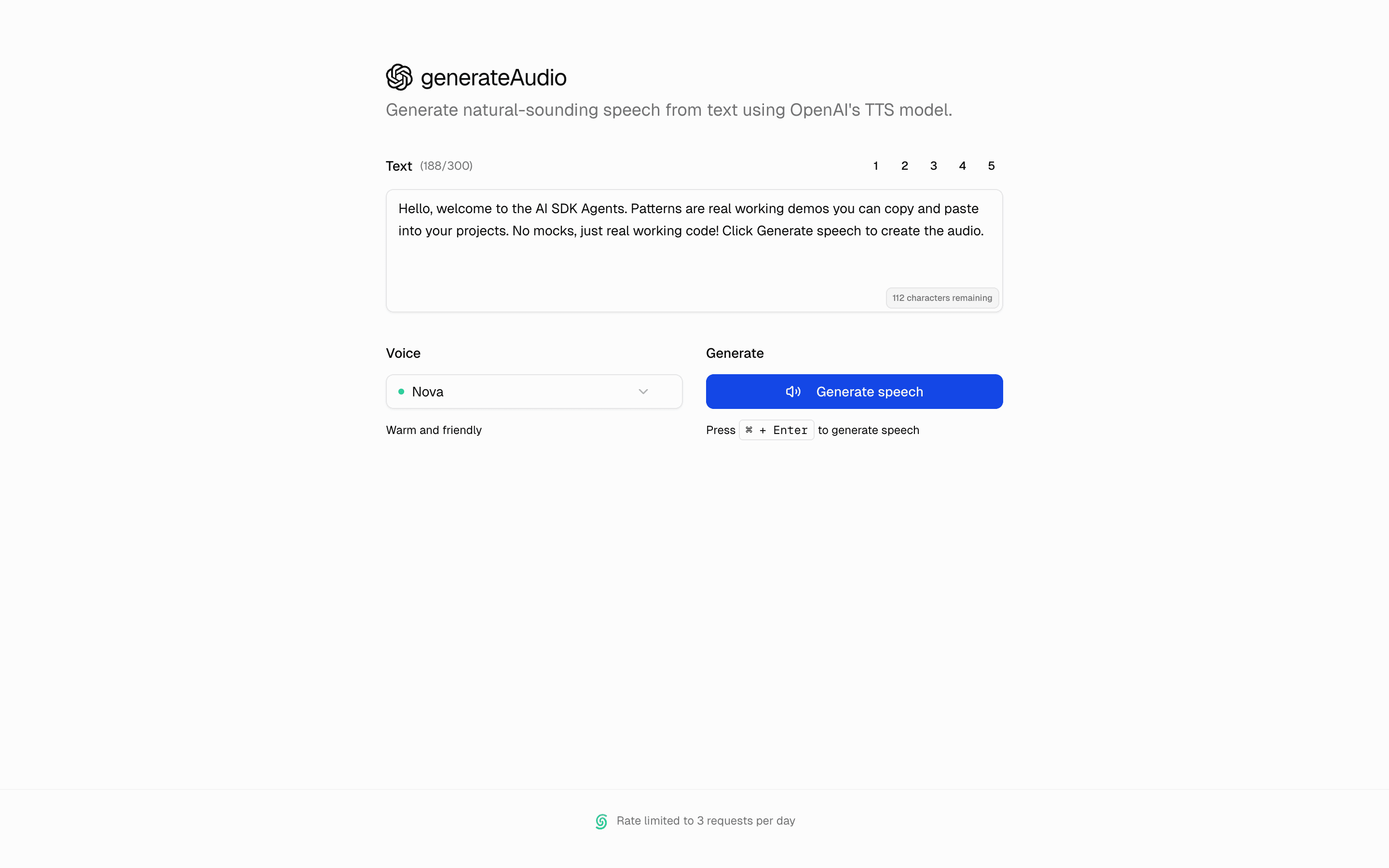
            Generate natural-sounding speech from text using OpenAI's TTS model.
          </p>
        </div>

        <div className="w-full">
          <SpeechSandbox />
        </div>
      </div>
      <footer className="border-border/40 border-t pb-4">
        <div className="flex w-full items-center justify-center px-4 py-6">
          <p className="text-muted-foreground text-xs">
            <UpstashIcon className="mr-2 inline-block h-4 w-4" />
            Rate limited to 3 requests per day
          </p>
        </div>
      </footer>
    </main>
  );
}

const OpenAIIcon = (props: SVGProps<SVGSVGElement>) => (
  <svg
    className="dark:fill-white"
    height="1em"
    preserveAspectRatio="xMidYMid"
    viewBox="0 0 256 260"
    width="1em"
    xmlns="http://www.w3.org/2000/svg"
    {...props}
  >
    <title>OpenAI</title>
    <path
      d="M239.184 106.203a64.716 64.716 0 0 0-5.576-53.103C219.452 28.459 191 15.784 163.213 21.74A65.586 65.586 0 0 0 52.096 45.22a64.716 64.716 0 0 0-43.23 31.36c-14.31 24.602-11.061 55.634 8.033 76.74a64.665 64.665 0 0 0 5.525 53.102c14.174 24.65 42.644 37.324 70.446 31.36a64.72 64.72 0 0 0 48.754 21.744c28.481.025 53.714-18.361 62.414-45.481a64.767 64.767 0 0 0 43.229-31.36c14.137-24.558 10.875-55.423-8.083-76.483Zm-97.56 136.338a48.397 48.397 0 0 1-31.105-11.255l1.535-.87 51.67-29.825a8.595 8.595 0 0 0 4.247-7.367v-72.85l21.845 12.636c.218.111.37.32.409.563v60.367c-.056 26.818-21.783 48.545-48.601 48.601Zm-104.466-44.61a48.345 48.345 0 0 1-5.781-32.589l1.534.921 51.722 29.826a8.339 8.339 0 0 0 8.441 0l63.181-36.425v25.221a.87.87 0 0 1-.358.665l-52.335 30.184c-23.257 13.398-52.97 5.431-66.404-17.803ZM23.549 85.38a48.499 48.499 0 0 1 25.58-21.333v61.39a8.288 8.288 0 0 0 4.195 7.316l62.874 36.272-21.845 12.636a.819.819 0 0 1-.767 0L41.353 151.53c-23.211-13.454-31.171-43.144-17.804-66.405v.256Zm179.466 41.695-63.08-36.63L161.73 77.86a.819.819 0 0 1 .768 0l52.233 30.184a48.6 48.6 0 0 1-7.316 87.635v-61.391a8.544 8.544 0 0 0-4.4-7.213Zm21.742-32.69-1.535-.922-51.619-30.081a8.39 8.39 0 0 0-8.492 0L99.98 99.808V74.587a.716.716 0 0 1 .307-.665l52.233-30.133a48.652 48.652 0 0 1 72.236 50.391v.205ZM88.061 139.097l-21.845-12.585a.87.87 0 0 1-.41-.614V65.685a48.652 48.652 0 0 1 79.757-37.346l-1.535.87-51.67 29.825a8.595 8.595 0 0 0-4.246 7.367l-.051 72.697Zm11.868-25.58 28.138-16.217 28.188 16.218v32.434l-28.086 16.218-28.188-16.218-.052-32.434Z"
      fill="currentColor"
    />
  </svg>
);

function UpstashIcon(props: SVGProps<SVGSVGElement>) {
  return (
    <svg
      {...props}
      height="341"
      preserveAspectRatio="xMidYMid"
      viewBox="0 0 256 341"
      width="256"
      xmlns="http://www.w3.org/2000/svg"
    >
      <title>Upstash</title>
      <path
        d="M0 298.417c56.554 56.553 148.247 56.553 204.801 0 56.554-56.554 56.554-148.247 0-204.801l-25.6 25.6c42.415 42.416 42.415 111.185 0 153.6-42.416 42.416-111.185 42.416-153.601 0L0 298.416Z"
        fill="#00C98D"
      />
      <path
        d="M51.2 247.216c28.277 28.277 74.123 28.277 102.4 0 28.277-28.276 28.277-74.123 0-102.4l-25.6 25.6c14.14 14.138 14.14 37.061 0 51.2-14.138 14.139-37.061 14.139-51.2 0l-25.6 25.6ZM256 42.415c-56.554-56.553-148.247-56.553-204.8 0-56.555 56.555-56.555 148.247 0 204.801l25.599-25.6c-42.415-42.415-42.415-111.185 0-153.6 42.416-42.416 111.185-42.416 153.6 0L256 42.416Z"
        fill="#00C98D"
      />
      <path
        d="M204.8 93.616c-28.276-28.277-74.124-28.277-102.4 0-28.278 28.277-28.278 74.123 0 102.4l25.6-25.6c-14.14-14.138-14.14-37.061 0-51.2 14.138-14.139 37.06-14.139 51.2 0l25.6-25.6Z"
        fill="#00C98D"
      />
      <path
        d="M256 42.415c-56.554-56.553-148.247-56.553-204.8 0-56.555 56.555-56.555 148.247 0 204.801l25.599-25.6c-42.415-42.415-42.415-111.185 0-153.6 42.416-42.416 111.185-42.416 153.6 0L256 42.416Z"
        fill="#FFF"
        fillOpacity=".4"
      />
      <path
        d="M204.8 93.616c-28.276-28.277-74.124-28.277-102.4 0-28.278 28.277-28.278 74.123 0 102.4l25.6-25.6c-14.14-14.138-14.14-37.061 0-51.2 14.138-14.139 37.06-14.139 51.2 0l25.6-25.6Z"
        fill="#FFF"
        fillOpacity=".4"
      />
    </svg>
  );
}
basics-generate-speech-openai

Join on desktop to see the interactive preview.
Convert text to speech using OpenAI's API. Includes multiple voices, speed control, and real-time playback for voiceovers and accessibility.
AI SDK APIs USED:
generateSpeech
Services used: